
Driver App adds students, settings and route directions QR code
More Enhanced Driver App features: add students from the menu, manifest and alert settings, a route directions QR code and stop street addresses, plus Parent App and Admin Portal fixes.
We've made improvements to RollCall to bring you a smoother, faster, and more secure experience.
Please print or forward this to the drivers and bus coordinators.
Rollout schedule and process
- The new Driver App features will be automatically rolled out to the devices late PM Thursday 16/10/25. Driver apps will be updated when turned on Friday morning.
- All other bug fixes will also be rolled out late PM 16/10/25.
- The Parent App updates are currently rolling out. They will flow through the Apple App Store and Google Play Store in phased rollouts, as determined by the app stores.
Enhanced Driver App: additional features
RollCall is excited to announce the release of additional features for our Enhanced Driver App.
Following the recent launch of the enhanced app, we're continuing to improve the driver experience with new functionality now available under the Menu (top left):
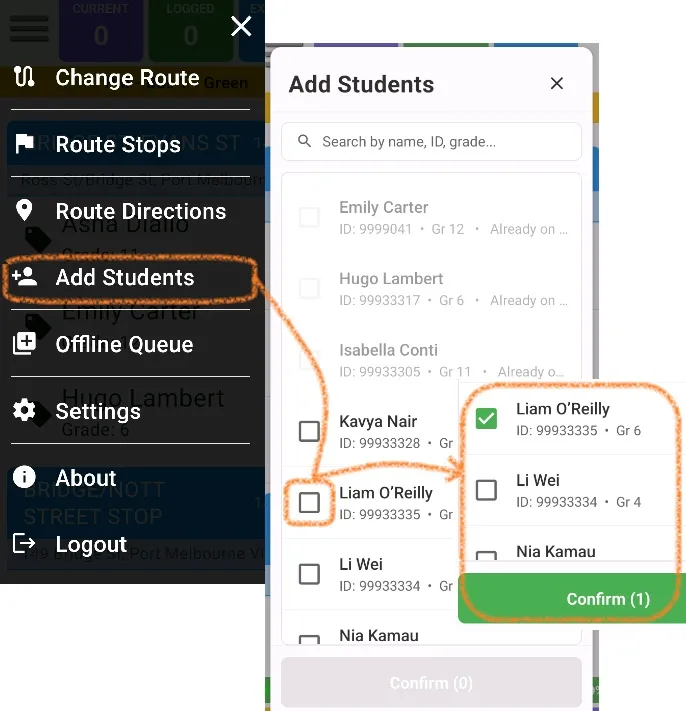
- Add Students: Quickly add new students to the manifests directly from the app.
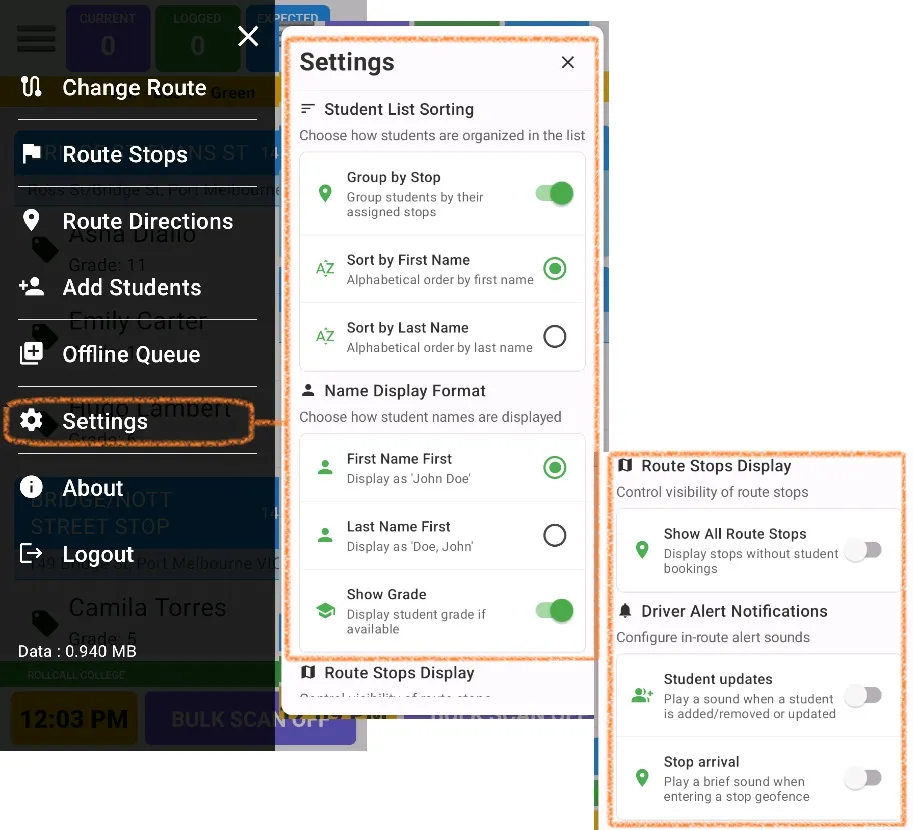
- Settings (Audible Alerts): Enable or adjust audible alerts for route notifications.
- Route Direction (QR Code): Access route directions easily using a QR code.
Updates displaying on the manifest section:
- Stop Name – Street Address: The stop's street address now appears directly below the stop name for improved accuracy and clarity.
- Highlighted Alerts – Behaviour and Sick: Behaviour and sick alerts are now clearly highlighted.
Other bug fixes and enhancements:
- Event group display now correctly filters by AM/PM/All Day settings
- Fixed student card code zero-padding issue
- PIN code limit increased to 10 digits (previously 4)
- Stop name font size optimised for better readability
- Bulk off offline sync reliability improvements
- Routes with no students now function correctly
- Enhanced GPS handling
- Improved restrictions for handling multiple devices on a single route
- Fixed route complete issue after bulk off, where it would go back to in progress
- Fixed auto scrolling to the top when Not Allocated group has many students
These updates are designed to make navigation and student management even simpler for drivers.
Driver App: highlighted updates
Add students
Drivers can now easily add students who aren't on the "booked" manifest while a trip is in progress.
From the menu (top left), select "Add Students", confirm the selection, and the student will be automatically scanned on.
Settings
You can now personalise your manifest view: choose the order of students and whether to display their grade.
You can also:
- Show all stops even if no students are allocated
- Turn on driver alert sounds when a student is removed live or when entering a geofence
Driver directions
Drivers can now easily access the Route Directions QR Code from the driver app.
Parent App improvements
- Bookings tab: redesigned with modern carousel interface
- Route mapping: fixed real-time mapping connectivity issues
- Parent access: fixed add secondary parent on web portal bug
- Bus absence: fixed confirm absence bug on Samsung devices
- Push/email notifications: resolved various delivery problems
- Push/email notifications: fixed not receiving scan off alerts bug
Admin Portal and backend improvements
- Transport screen now displays clear $0 charge explanations
- Transport screen now can display a student's grade
- Improvements to force logout reliability
- Improvements to map screen styling
- Improvements to SSO parameters